Auto 8% OFF

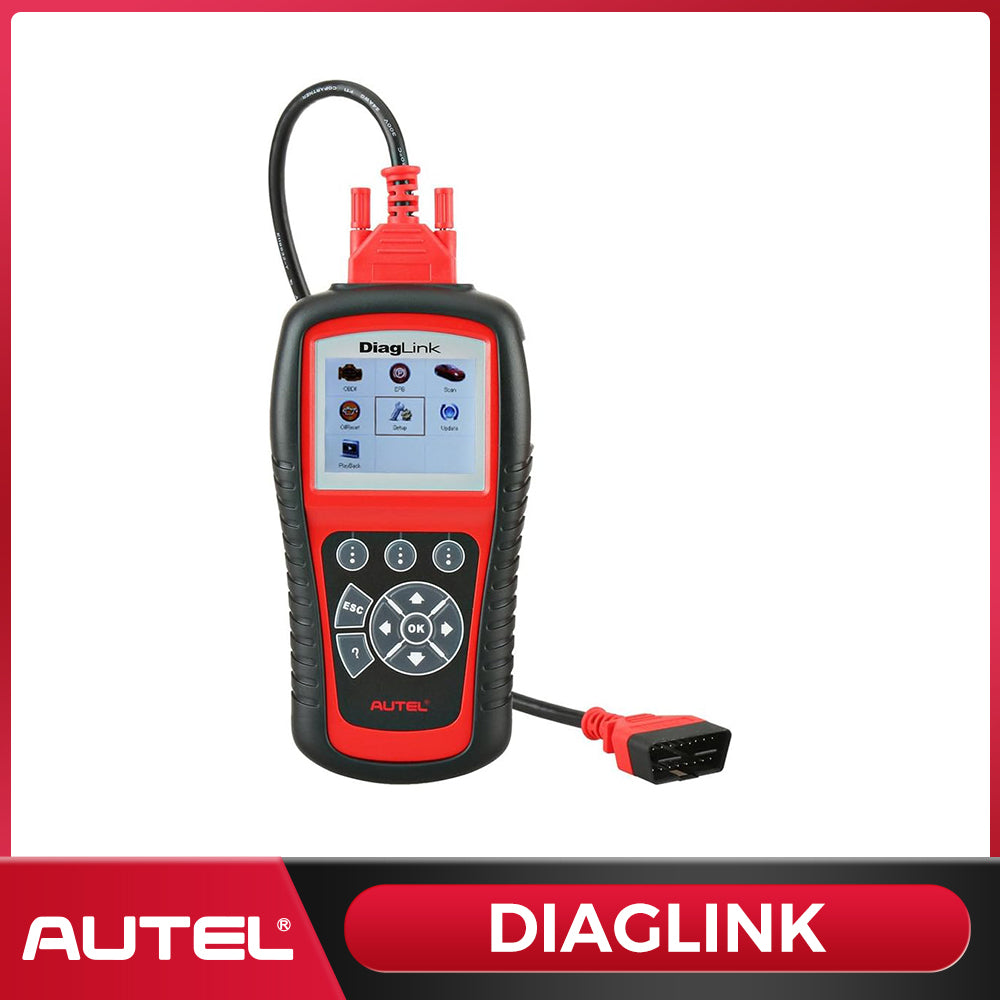
DiagLink

Autel DiagLink is a new specialized diagnostic tool for DIY Users and Auto Service Technicians. It supports the diagnosis for all electronic systems of models compliant with OBDII/EOBD and CAN, including EPB maintenance and OLS service. It enables you to accurately diagnose complex problems and makes your vehicle service experience much more convenient!

€99,00
€109,00
€99,00
Save €10,00
IN STOCK
1073 sold in past month
Make Offer
Order within the next hours minutes to receive it. Estimated delivery is between and
Buy now, pay later with Klarna or Afterpay – no interest, no fees.
10 customers are adding this product to cart
US Free shipping & No Tax. It usually takes 3-7 business days for your package to be delivered, so you can sit back and relax, worry-free. If the item is out of stock, it may take 7–15 days to restock. Thanks for your patience. *Please see our shipping policy for more details.
Return undamaged products within 30 days for a full refund. Refunds are processed after the returned item has been received and inspected. Please refer to our Refund Policy for full details and requirements.
We offer a complimentary one-year warranty for your peace of mind. For any warranty-related inquiries, please contact us at sales@autelonline.com.
We’re committed to providing ongoing support for the lifetime of your product. For any questions or concerns, please contact us at sales@autelonline.com.
PAYPAL Apple Pay Google Pay VISA MASTERCARD American Express DISCOVER Klarna After Pay
DiagLink

DiagLink

€109,00 €99,00

DiagLink

€109,00 €99,00

The Autel DiagLink is a professional-grade OBD2 scanner built for DIY enthusiasts and home mechanics. Get dealer-level all-system diagnostics, reset service lights, and read/clear fault codes — all at an affordable price. No subscription fees, no hidden costs.

Key Features at a Glance

  • Full all-system diagnostics: engine, transmission, ABS, SRS, and more
  • 10 special reset functions, including Oil Reset & EPB Reset
  • Complete OBD2/EOBD functions for check engine light diagnosis
  • Wide vehicle coverage: 80+ US, European & Asian car brands

Autel Diaglink key features

All-System Diagnosis — Go Beyond the Engine

  • Diagnose every major vehicle system, not just the engine
  • Read & clear DTCs across ABS, SRS, transmission, and body modules
  • Live data stream for real-time monitoring of vehicle health

Autel Diaglink All Systems Diagnoses

Oil Reset & EPB Reset — Service Functions Made Easy

  • Reset the oil service light after every oil change
  • Electronic Parking Brake (EPB) reset for safe brake pad replacement
  • Additional service resets: TPMS, SAS, BMS, throttle, and more

Oil reset & EPB reset

Full OBD2 Functions — Complete Code Reader

  • All 10 OBD2 test modes: I/M readiness, O2 sensor, EVAP, freeze frame & more
  • Instantly identify check engine light causes and clear codes
  • Compatible with all OBD2-compliant vehicles (1996 and newer)

Autel Diaglink Full OBDII Functions

Backed by Autel Support. Before purchasing, please check whether this product is compatible with your vehicle.

Step1:Enter the Autel Official Website

Enter the URL to access the Autel official website. Click on “Support” at the top of the page, and then click on the “Vehicle Coverage” to be redirected to the relevant page to find out if the Diaglink can be used on your vehicle

Step2:Enter the Necessary Information

Select the “Product Model”, “Vehicle Make”, “Vehicle Model”, and “Year” in the drop-down box and click on SEARCH, and then you can look up the relevant functions in different systems.

Step3:Autel'Support

In addition to checking the availability through the Autel website, you can also contact our tech support directly via email or QA. We are available 24/7 to answer your questions.

Autel supportAutel Vehicle CoverageAUtel tech support service

Update Procedure

1. Connect your Diaglink to your PC, Diaglink will boot up. Select Update and press OK to get in.

Note: You can connect DiagLink to your PC via USB cable or use a card reader/adapter to load the SD card to update your device.

2. Run the Maxi PC Suite, and it will automatically recognize the device and show you updating windows.

Note: You can get one piece of FREE manufacturer software at the initial time.

If you need other vehicle brands software, you need to purchase it separately. Each piece of vehicle software costs 10 USD.

3. Diaglink provides free service and OBDII software. Click Update to download it

4. Click Free to download the vehicle software you need.

5. Click Installed, you can check what software you have installed in your device.

If you want to download another car make, please click Purchase; it will guide you to purchase it from the Autel website.

Note: Before purchasing, please download the first free software via PC suite, otherwise you will lose access to the free vehicle software.

For your optimal use

  • Free lifetime software updates to stay current with new vehicle models
  • Dedicated Autel technical support team available when you need help
  • Trusted by professional technicians and DIY car owners worldwide

Stop guessing. Start diagnosing. The Autel DiagLink gives you the power of a professional scan tool at a fraction of the cost — perfect for any DIY car diagnostic job.

Display2.8�� TFT color display (320 x 240)
Operating Temperature0 to 60��C (32 to 140��F)
Storage Temperature-20 to 70��C (-4 to 158��F)
External Power12.0 V to 18.0 V power provided via vehicle battery
Dimensions L x W x H198.5 mm (7.81��) x 103.8 mm (4.09��) x 37.5 mm (1.48��)
Weight0.28 kg (w/o main cable) 0.435 kg (with main cable)

* OBD II Cable
* User Manual
* Micro SD card
* Carry case
* CD
* USB Cable

Customer Reviews

Based on 41 reviews
100%
(41)
0%
(0)
0%
(0)
0%
(0)
0%
(0)
A
Anonymous

Great product which worked just as expected

C
Corey Shelton
simple diagnosticscanner

Easy to use diagnostic code scanner. Was able to set -up without taking out sd card.Loaded my free software package and purshased another.Works well on 2001 f150 and 2020 Honda crv.Has other useful features that i will need in the future (epb reset).So far happy with purchase.

M
Michael Mcclure
Great

👍

N
Nathan Roach
Works great.

Did everything the most expensive computer can do. Reads all codes. I downloaded the one free brand (chevy) and bought the Toyota one for $10 bucks. I've been very happy with it. Already saved me hundreds of cost from dealership.

C
Corey Hernandez
Good

Happy with the item

  • Description
  • The Autel DiagLink is a professional-grade OBD2 scanner built for DIY enthusiasts and home mechanics. Get dealer-level all-system diagnostics, reset service lights, and read/clear fault codes — all at an affordable price. No subscription fees, no hidden costs.

    Key Features at a Glance

    • Full all-system diagnostics: engine, transmission, ABS, SRS, and more
    • 10 special reset functions, including Oil Reset & EPB Reset
    • Complete OBD2/EOBD functions for check engine light diagnosis
    • Wide vehicle coverage: 80+ US, European & Asian car brands

    Autel Diaglink key features

    All-System Diagnosis — Go Beyond the Engine

    • Diagnose every major vehicle system, not just the engine
    • Read & clear DTCs across ABS, SRS, transmission, and body modules
    • Live data stream for real-time monitoring of vehicle health

    Autel Diaglink All Systems Diagnoses

    Oil Reset & EPB Reset — Service Functions Made Easy

    • Reset the oil service light after every oil change
    • Electronic Parking Brake (EPB) reset for safe brake pad replacement
    • Additional service resets: TPMS, SAS, BMS, throttle, and more

    Oil reset & EPB reset

    Full OBD2 Functions — Complete Code Reader

    • All 10 OBD2 test modes: I/M readiness, O2 sensor, EVAP, freeze frame & more
    • Instantly identify check engine light causes and clear codes
    • Compatible with all OBD2-compliant vehicles (1996 and newer)

    Autel Diaglink Full OBDII Functions

    Backed by Autel Support. Before purchasing, please check whether this product is compatible with your vehicle.

    Step1:Enter the Autel Official Website

    Enter the URL to access the Autel official website. Click on “Support” at the top of the page, and then click on the “Vehicle Coverage” to be redirected to the relevant page to find out if the Diaglink can be used on your vehicle

    Step2:Enter the Necessary Information

    Select the “Product Model”, “Vehicle Make”, “Vehicle Model”, and “Year” in the drop-down box and click on SEARCH, and then you can look up the relevant functions in different systems.

    Step3:Autel'Support

    In addition to checking the availability through the Autel website, you can also contact our tech support directly via email or QA. We are available 24/7 to answer your questions.

    Autel supportAutel Vehicle CoverageAUtel tech support service

    Update Procedure

    1. Connect your Diaglink to your PC, Diaglink will boot up. Select Update and press OK to get in.

    Note: You can connect DiagLink to your PC via USB cable or use a card reader/adapter to load the SD card to update your device.

    2. Run the Maxi PC Suite, and it will automatically recognize the device and show you updating windows.

    Note: You can get one piece of FREE manufacturer software at the initial time.

    If you need other vehicle brands software, you need to purchase it separately. Each piece of vehicle software costs 10 USD.

    3. Diaglink provides free service and OBDII software. Click Update to download it

    4. Click Free to download the vehicle software you need.

    5. Click Installed, you can check what software you have installed in your device.

    If you want to download another car make, please click Purchase; it will guide you to purchase it from the Autel website.

    Note: Before purchasing, please download the first free software via PC suite, otherwise you will lose access to the free vehicle software.

    For your optimal use

    • Free lifetime software updates to stay current with new vehicle models
    • Dedicated Autel technical support team available when you need help
    • Trusted by professional technicians and DIY car owners worldwide

    Stop guessing. Start diagnosing. The Autel DiagLink gives you the power of a professional scan tool at a fraction of the cost — perfect for any DIY car diagnostic job.

  • Specifications
  • Display2.8�� TFT color display (320 x 240)
    Operating Temperature0 to 60��C (32 to 140��F)
    Storage Temperature-20 to 70��C (-4 to 158��F)
    External Power12.0 V to 18.0 V power provided via vehicle battery
    Dimensions L x W x H198.5 mm (7.81��) x 103.8 mm (4.09��) x 37.5 mm (1.48��)
    Weight0.28 kg (w/o main cable) 0.435 kg (with main cable)
  • Downloads
  • Accessories
  • * OBD II Cable
    * User Manual
    * Micro SD card
    * Carry case
    * CD
    * USB Cable

  • Reviews
  • Customer Reviews

    Based on 41 reviews
    100%
    (41)
    0%
    (0)
    0%
    (0)
    0%
    (0)
    0%
    (0)
    A
    Anonymous

    Great product which worked just as expected

    C
    Corey Shelton
    simple diagnosticscanner

    Easy to use diagnostic code scanner. Was able to set -up without taking out sd card.Loaded my free software package and purshased another.Works well on 2001 f150 and 2020 Honda crv.Has other useful features that i will need in the future (epb reset).So far happy with purchase.

    M
    Michael Mcclure
    Great

    👍

    N
    Nathan Roach
    Works great.

    Did everything the most expensive computer can do. Reads all codes. I downloaded the one free brand (chevy) and bought the Toyota one for $10 bucks. I've been very happy with it. Already saved me hundreds of cost from dealership.

    C
    Corey Hernandez
    Good

    Happy with the item

    Related Products

    Recently Viewed Products